Skip & Display Logic: Personalizing the "What" in Your EMA Surveys
A survey that asks the right questions to the right people is a survey that gets completed. Skip logic and display logic are now available on Labfront.
Skip & Display Logic: Personalizing the "What" in Your EMA Surveys
A survey that asks the right questions to the right people is a survey that gets completed. Skip logic and display logic are now available on Labfront.
Asking a non-smoker about their cigarette count every day for 90 days doesn't just produce bad data. It erodes trust in your protocol. Participants who encounter irrelevant questions start to disengage, and that disengagement builds over weeks into lower completion rates and noisier data. Labfront's skip and display logic let you build surveys that feel relevant from the first prompt to the last.
What is the difference between skip logic and display logic in survey design?
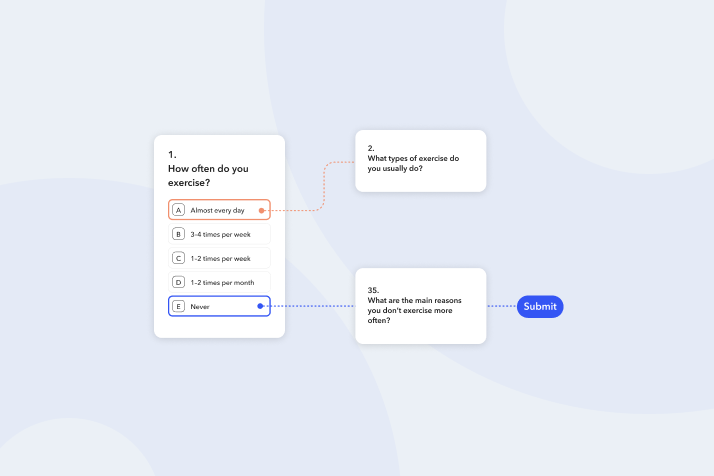
Skip logic is about movement. It routes participants forward to a different question, section, or the end of the survey based on their answer. Think of it as a fast-forward button.
Display logic is about visibility. It shows or hides a specific question (or entire section) based on a prior answer. Think of it as a toggle switch.
Type
Action
Best Used For
Example
⏩ Skip Logic
Routes participant forward to a new destination
Bypassing large irrelevant sections; screening disqualification
How do you apply display logic to an entire section in Labfront?
If a block of questions all depend on the same prior answer, don't apply display logic to each question individually. Apply it once to the section that contains them. If the condition isn't met, the entire section stays hidden. This one practice cuts setup time significantly, reduces the chance of logic errors, and makes future protocol changes much simpler.
📋
Use Case: Anxiety Screening with Coping Strategy Follow-Up
Section 1: Screening Baseline
S1-Q1: "Over the last 2 weeks, how often have you felt nervous or on edge?" (Scale 1-4)
Section 2: Coping Strategies (Conditional)
Display Logic: Show only if S1-Q1 = 3 OR 4
S2-Q1: "Have you sought help from a professional?"
S2-Q2: "Describe your most effective coping mechanism." (Open text)
Section 3: General Study Questions
Default flow | Visible to all participants
Result: Low-symptom participants never see sensitive coping questions. High-symptom participants get targeted follow-up immediately. One section-level rule handles the entire block, with no per-question logic required.
Scientific impact: Reduces burden for low-symptom participants; targets sensitive data collection to the relevant cohort; supports ethical best practice in clinical EMA research.
How does skip logic work in practice? A lifestyle screening example
📋
Use Case: Intermittent Fasting and Sleep Quality Study
Section 1: Screening Participation
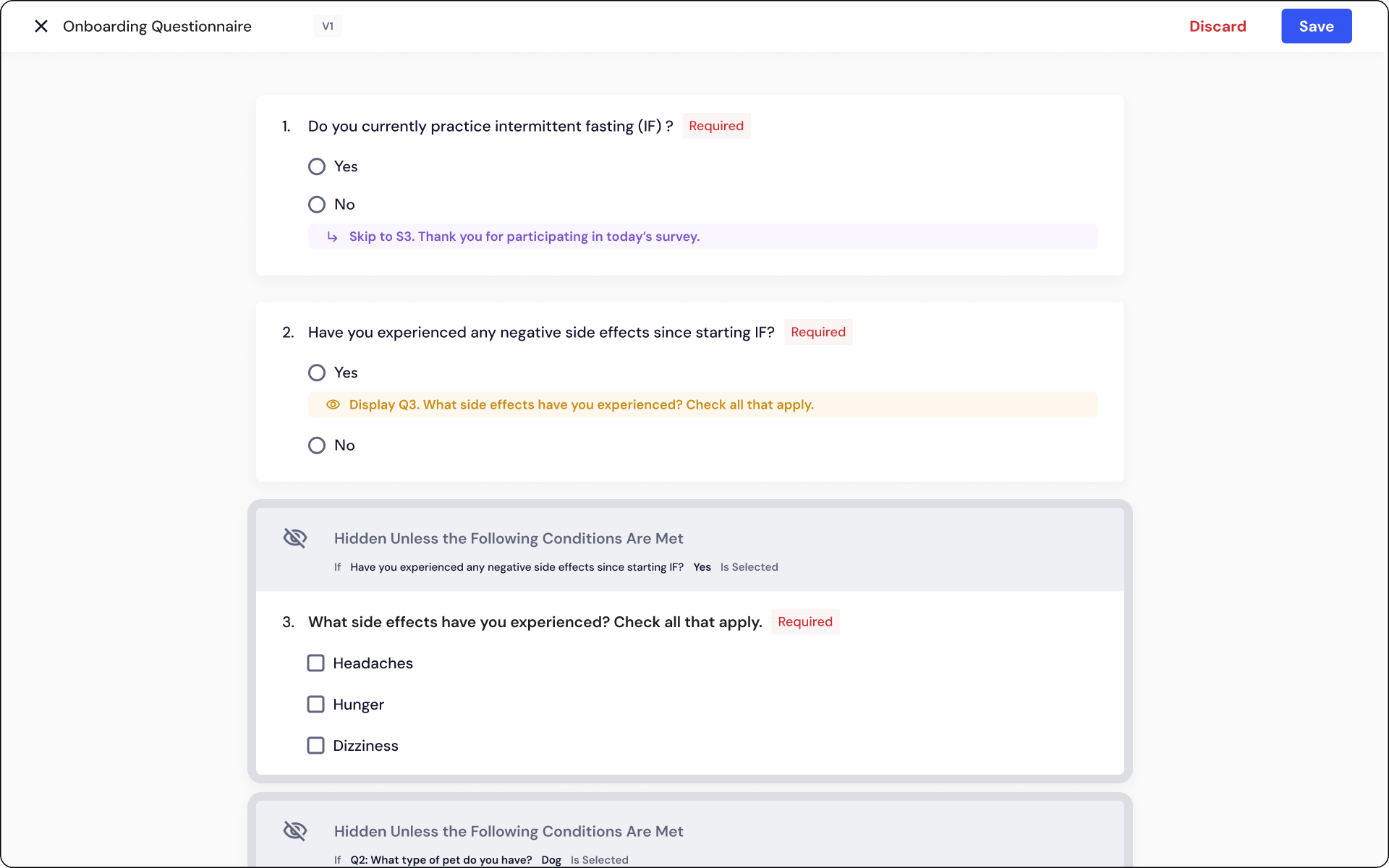
S1-Q1: "Do you currently practice Intermittent Fasting?" (Yes/No) → If "No": Skip Logic → Jump to Section 3: Sleep & General Health → If "Yes": Continue to Section 2: IF Protocol Details
Section 2: IF Protocol Details (Conditional)
Visible only to active IF practitioners
S2-Q1: "What IF protocol do you follow?" | S2-Q2: "How long have you followed it?" Section-level skip: If S1-Q1 = "No" → Skip to Section 3
Section 3: Sleep & General Health
Default flow | Visible to all participants
Result: Non-IF participants skip the detail block entirely. IF protocol data is collected exclusively from relevant participants.
Scientific impact: Eliminates construct contamination; reduces per-survey time for non-practitioners; improves data relevance across the full dataset.
Advanced tips
The soft landing strategy
When a survey ends early based on a response, like a disqualification, participants may notice the button changed to "Submit" and go back to change their answer. To prevent this: create a final "Thank You" or "Conclusion" section and route early-exit participants there via skip logic, rather than directly to Submit. Every participant reaches a natural endpoint, regardless of how many questions they answered.
Logic conflicts are handled automatically
If skip logic routes a participant to a question that's currently hidden by display logic, Labfront resolves the conflict automatically. It skips the hidden question and shows the next visible one. Participants never get stuck.
Required questions + logic
Questions marked as Required must be completed once seen, but that requirement is automatically waived for questions hidden by display logic or bypassed by skip logic. You can mark all critical questions Required without worrying that conditional paths will block submission for participants who never see them.
Map before you build
Logic gets complex quickly. Before opening the editor, sketch your survey flow on paper: branching arrows, section labels, skip destinations. This surfaces structural problems before they're baked into your study design and prevents the most common logic errors.
Does survey logic actually improve long-term EMA compliance?
EMA studies ask for sustained engagement over days, weeks, or months. Relevance is one of the strongest predictors of whether a participant is still completing surveys on Day 56 of a 90-day protocol. A survey that feels right, that only asks what applies right now, tells participants the research is worth their time. Over 90 days, that perception compounds. Participant-centric survey design isn't just good methodology. It's practical retention strategy.
Skip logic (sometimes called branching) automatically routes a participant to a later point in a questionnaire based on how they answer a specific question. If a participant answers "No" to a screening question, skip logic jumps them past all follow-up questions that don't apply, taking them directly to the next relevant section or the end of the survey. In Labfront, skip logic works with single-answer question types (Multiple Choice and Number) and always moves participants forward — never backward.
Display logic controls whether a specific question or section appears on screen based on a previous answer. Unlike skip logic, which moves the participant to a new location, display logic simply toggles a question's visibility in place. If the condition is not met, the question stays hidden and the participant never sees it. In Labfront, display logic can be applied to individual questions or to entire sections, and multiple rules function as an OR operator — the question appears if any one condition is true.
Skip logic moves participants forward in the survey to a specific destination — a question, section, or the end. Display logic shows or hides content based on conditions without changing the participant's position in the flow. Use skip logic when you need to bypass a large block of irrelevant content quickly. Use display logic when you need a follow-up question to appear immediately after a specific answer, keeping the experience conversational.
Labfront handles this conflict automatically. If the destination question is hidden by display logic, the system skips past it and shows the next available visible question instead. Participants are never routed to a blank or broken state. This means you can build complex multi-condition surveys without needing to manually account for every possible logic interaction.
Yes. Unlike task scheduling, skip and display logic is available in all Labfront projects, including legacy projects created before October 2025. You can add or edit logic on any questionnaire task through the Edit Logic panel on each question or section header.
Questions that are skipped via skip logic or hidden via display logic are recorded as Empty in Labfront's CSV export. This is intentional and correct — it signals that the logic rule fired and the question was not applicable to that participant, rather than indicating missing or refused data. There is no need to recode or flag these values; they are structurally distinct from genuinely missing responses.
Ready to try survey logic?
Explore the full logic documentation or try it out now in your Project dashboard.
All-In-One Research Solution for Real-World Data Capture
Labfront is a health data analytics company that offers a comprehensive product designed to help researchers collect, analyze, and derive insights from wearable device data. Their platform integrates seamlessly with various health sensors, providing advanced analytics and customizable features to support scientific research in fields such as sleep, stress, and overall physiological monitoring.
Subscribe to Human Science
Subscribe to Human Science
“Now, more than ever, we need tools like Labfront that can help researchers take their research and data collection virtual.”
Dr. Gloria Yeh, MD
Associate Professor of Medicine, Harvard Medical School
“The Labfront team was extremely responsive to our requests and made every effort to accommodate our unique needs.”
Yogev Kivity, Ph.D.
Senior Lecturer of Psychology, Bar Ilan University
"Labfront's analysts understood our needs as researchers and saved us weeks of work when they prepared our datasets for analysis."
Bryan Edwards, Professor, Joe Synar Chair
Management Department, Oklahoma State University
“The physiological data really helped provide deeper insights. We recommend Labfront and will definitely be using it again!”





.svg)


.webp)


.svg)